
 Proofreading & Editing

 Academic Editing Services

 Admissions Editing Services

 Business Editing Services
6 Best AI PDF Summarizer Tools in 2026
Lengthy PDFs can take hours to read, especially when they contain intricate research methods, technical terms, extensive reports, or detailed tables and figures. For students, researchers, and professionals, an AI PDF summarizer can help reduce that reading time by extracting key points, summarizing arguments, and simplifying complex documents.
The best AI PDF summarizer should provide more than just a condensed version of the text. It should help users understand the document accurately, identify important findings, and verify key points against the original PDF. This is especially important for research papers, academic articles, reports, manuals, and technical documents.
In this guide, we compare six AI PDF summarizer tools in 2026, focusing on practical criteria such as summary quality, supported file formats, source support, research paper suitability, multilingual support, and pricing.
Quick Comparison: Best AI PDF Summarizers in 2026
| Tool | Key Features | Supported File | Summary Quality | Source Support | Research Paper Suitability | Multilingual Support | Pricing |
|---|---|---|---|---|---|---|---|
| Wordvice AI PDF Summarizer | PDF summaries, key points, and citation-backed insights | PDF upload, PDF URL | Strong for long and academic PDFs | Citation-backed insights based on actual PDF content | Strong for research papers, reports, and technical documents | Yes | Free with limits / paid options |
| PDF AI | PDF chat and document Q&A | PDF upload | Good for interactive PDF understanding | Document-based answers | Good for general PDF review | Yes | Free with limits / paid options |
| ChatPDF | PDF Q&A and quick summaries | PDF upload | Good for fast document exploration | Cited answers from the PDF | Good for students and professionals | Yes | Free with limits / paid options |
| Smallpdf AI PDF Summarizer | PDF summaries and key points | PDF and other file types | Good for general PDFs | Page references for verification | Good for reports, notes, and general documents | Varies | Free to try / paid options |
| Scholarcy | Structured academic paper summaries | PDF, Word, articles, and more | Strong for academic summaries | References and structured research summaries | Strong for literature review workflows | Limited / varies | Free trial / paid options |
| SciSpace | Research paper summaries and explanations | PDF upload | Strong for scientific and technical papers | Citation-linked answers | Strong for researchers and academic papers | Yes | Free trial / paid options |
1. Wordvice AI PDF Summarizer
Best for: Students, researchers, and professionals summarizing research papers, reports, and lengthy PDFs
Pricing: Free with limits / paid options
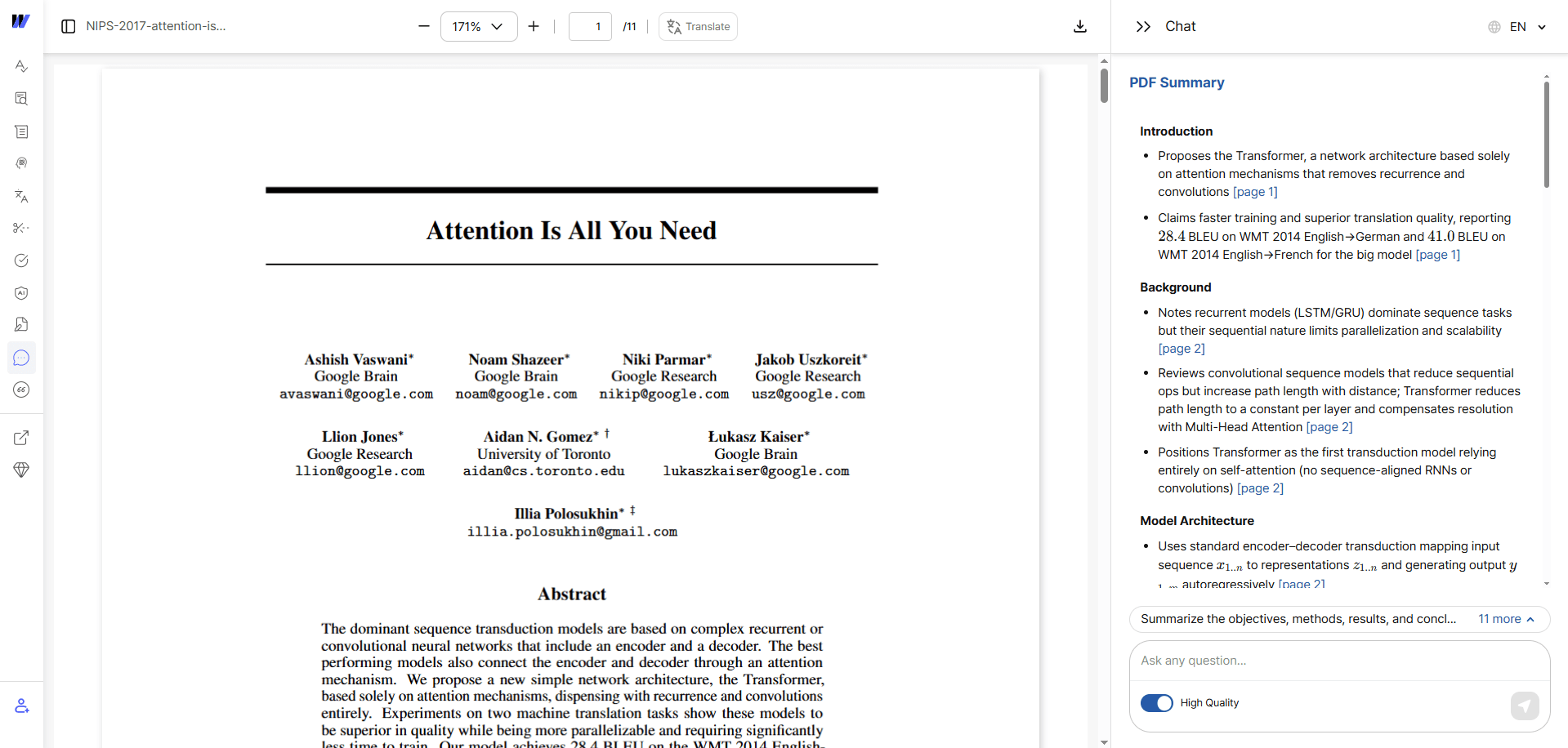
Wordvice AI PDF Summarizer is a potential option for users seeking a comprehensive summary rather than just a brief abstract. It is designed to summarize lengthy PDFs, research papers, reports, and technical documents, helping users trace key points back to the original document.
A major advantage is its citation-backed insight feature. Instead of giving only a generic summary, Wordvice AI bases its summaries on the actual PDF content. This is useful for academic and professional users who need clarity on the sources of significant points before citing, discussing, or relying on them.
Key strengths:
- Provides citation-backed insights based on actual PDF content.
- Supports PDF upload, PDF URL input, multilingual summarization, and files up to 50MB.
Limitations:
- It currently focuses on PDF files, so users who need to summarize other formats should use Wordvice AI's related summarization tools.
Best use case: Use Wordvice AI PDF Summarizer when you need source-backed summaries of research papers, academic PDFs, technical documents, and reports. Wordvice AI also offers AI Summarizer for pasted text, Word Summarizer for Word documents, Website Summarizer for web pages, and YouTube Video Summarizer for video content.
2. PDF AI
Best for: Interactive PDF chat and document Q&A
Pricing: Free with limits / paid options
PDF AI is useful for users who want to upload a PDF and inquire about its content. Instead of only providing a static summary, it lets users interact with the PDF in a chat-style workflow. This makes it helpful for reviewing contracts, reports, articles, manuals, and study documents.
The primary advantage is flexibility. Users can ask follow-up questions, request explanations, or search for specific information within the document. This is useful when you do not simply want a summary but want to explore a PDF section by section.
Key strengths:
- Good for follow-up questions about uploaded PDFs.
- Useful for overall document review and engaging with PDF content.
Limitations:
- For academic papers, users should check how clearly the tool links responses to the original source before relying on the summary.
Best use case: Use PDF AI for an interactive experience with documents, enabling you to engage in conversation and explore the content rather than just getting a brief overview.
3. ChatPDF
Best for: Quick PDF Q&A and fast document exploration
Pricing: Free with limits / paid options
ChatPDF is one of the most familiar tools for users who want to upload a PDF and ask questions about it. It is especially useful for students, researchers, and professionals who need to understand lengthy documents quickly.
The tool works effectively for fast document navigation. Users can upload a PDF, ask questions, and obtain responses linked to the original PDF content. This simplifies the process of confirming the origin of a response and allows for further investigation of the document.
Key strengths:
- Simple chat-based workflow for inquiring about PDFs.
- Answers are linked to the original PDF content for easier verification.
Limitations:
- It is strongest for quick Q&A and exploration, but users may need a more structured tool for academic literature review workflows.
Best use case: Use ChatPDF for a quick method to inquire about a PDF, summarize academic articles, and extract key points from reports.
4. Smallpdf AI PDF Summarizer
Best for: General PDF summaries within a broader PDF tool platform
Pricing: Free to try / paid options
Smallpdf AI PDF Summarizer is a practical option for users who already work with PDFs and want summarization inside a broader PDF toolkit. It can summarize PDFs and other supported file types, making it useful for students, researchers, and professionals who work with different document formats.
Smallpdf focuses on fast, accessible summarization. Users can upload a document, receive an overview, and use AI chat to dig deeper into the file. Its page reference support is useful for checking summary points against the original document.
Key strengths:
- Supports PDFs and other file types such as Word, Excel, PowerPoint, and image files.
- Offers summaries, key takeaways, AI chat, and page references.
Limitations:
- It is a general document summarizer, so it may not be as specialized for academic research workflows as tools built specifically for research papers.
Best use case: Use Smallpdf for AI summarization within a comprehensive toolkit for PDFs and documents.
5. Scholarcy
Best for: Academic paper summaries and literature review workflows
Pricing: Free trial / paid options
Scholarcy is built for academic reading and research workflows. It summarizes papers, articles, textbook chapters, and other documents into structured summary flashcards. This makes it useful for students and researchers who need to process multiple academic sources.
Scholarcy is particularly useful when reading numerous papers for a literature review. Its structured summaries, highlights, and research-focused features can help users identify key findings, concepts, and contributions without starting from a blank page.
Key strengths:
- Creates structured flashcard summaries for papers, articles, and textbooks.
- Supports importing multiple document types, including PDFs and Word documents.
Limitations:
- It may feel more academic and workflow-heavy than what users need for simple PDF summaries.
Best use case: Use Scholarcy when you need to summarize and organize academic papers for study, research, or literature review tasks.
6. SciSpace
Best for: Scientific papers, technical PDFs, and citation-linked explanations
Pricing: Free tier / paid options
SciSpace is designed for researchers who need to understand academic papers and scientific concepts. Its Chat with PDF feature allows users to upload a paper, ask questions, and receive citation-linked answers, summaries, and follow-up explanations.
This makes SciSpace especially useful for scientific and technical reading. It can explain complex text, provide section-wise summaries, and support users who intend to understand methods, results, terminology, and related research.
Key strengths:
- Provides citation-linked answers and paper summaries.
- Supports scientific PDFs, follow-up questions, and multilingual use.
Limitations:
- It may be more research-oriented than necessary for users who only need a quick summary of a general PDF.
Best use case: Use SciSpace if you read scientific papers and need citation-linked explanations, research paper summaries, and assistance with understanding technical content.
How to Choose the Best AI PDF Summarizer?
The best AI PDF summarizer depends on the type of document. A tool that works well for a short report may not be enough for a complex research paper or technical manual.
Before choosing a tool, check whether it offers:
- accurate summaries of long PDFs
- PDF upload or PDF URL support
- source support or citation-backed insights
- research paper suitability
- multilingual summarization
- useful free access or clear pricing
- file size and page limits that fit your documents
For academic and research use, source support is especially important. If a summary makes a claim about a study's methods, results, or limitations, you should be able to check that point in the original PDF. This helps prevent mistakes while taking notes, writing a literature review, preparing a presentation, or citing a source.
Why You Should Still Review AI-Generated Summaries?
AI PDF summarizers can save time, but they should not replace careful reading. A summary may simplify a complex argument, overlook a limitation, misinterpret a table or figure, or omit details that are crucial for your assignment, project, or research.
Thus, source support cannot be ignored. A tool with citation-backed or source-linked summaries helps users trace important points back to the original PDF. Wordvice AI PDF Summarizer is useful in this workflow because its citation-backed insights are grounded in the actual document content, making it easier to verify key ideas before using them.
For everyday reading, a quick summary may suffice. For research papers, reports, and technical documents, always check the original PDF before using summarized information in academic writing, professional work, or decision-making.
FAQs About AI PDF Summarizers
Which is the best AI PDF summarizer in 2026?
The best AI PDF summarizer depends on your specific requirements. For research papers and extensive academic PDFs, choose a tool that provides accurate summaries, source-backed insights, PDF upload or URL support, and transparent pricing options.
Which is the best AI to summarize PDFs for students?
Students should look for an AI PDF summarizer that can handle long documents, explain key points clearly, support research papers, and help verify summary points against the original PDF.
Can AI summarize research papers accurately?
Yes, AI can summarize research questions, methods, findings, and conclusions. For research papers, choose a tool with source-backed summaries so you can verify key points in the original PDF before citing them.