PDF Translator

Translate PDF documents instantly with AI-powered accuracy that preserves your original formatting.

Translate PDF to

Drag and drop or click here to upload

Limit: 50MB

or

Overcome Language Barriers with our PDF Translator

Break through language barriers in your document workflows with our PDF translator across 47+ languages.
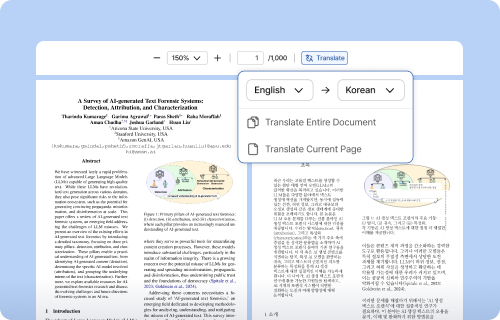
Format-Preserving Translation

Format-Preserving Translation

PDF translator maintains layout, formulas, tables, and other visual elements—no manual reformatting needed.
Translate PDF document pages or entire files without affecting original formatting
Automatically extract and translate text embedded in formulas, tables, charts, and diagrams
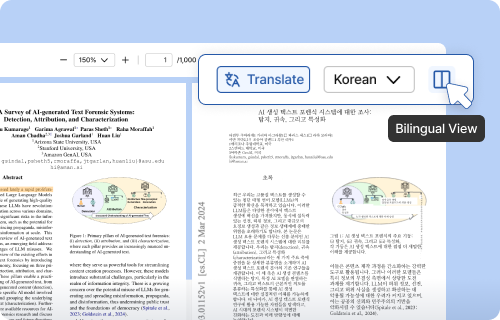
Side-by-Side Translation View

Side-by-Side Translation View

Compare original and translated documents simultaneously in synchronized dual panes—perfect for verifying cross-reference terminology.
Compare original and translated versions side-by-side for precise understanding
Download translated documents in their original format
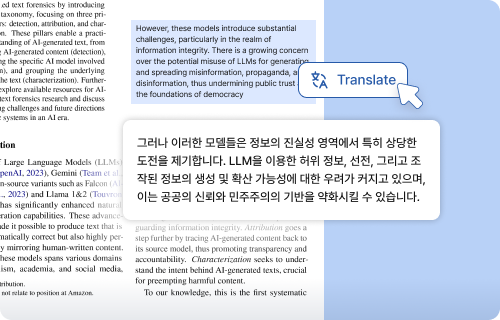
Instant Text Translation

Instant Text Translation

Highlight any text for immediate, context-aware translation without leaving your document—ideal for multilingual research.
Select specific paragraphs for targeted translation
Drag to highlight any text passage and translate instantly

FAQ

Choose the target language, and simply upload your PDF document to receive your translated PDF instantly with our PDF translator.
Our PDF document translator offers superior formatting preservation for complex layouts and formulas.
Yes. Our PDF Translator preserves layout, formulas, and tables while translating, maintaining the original document structure.
Yes. You can translate PDF files entirely, select specific pages, or drag to highlight any text passage for instant, context-aware translation.

Yes! Wordvice AI offers PDF translator with the following features:

  • Upload up to 100 pages per month
  • Translate PDF documents up to 100 PDF pages per month
  • 300 MB of storage capacity
Using the side-by-side translation is simple—just press the “Dual Language View" button in the ChatPDF Online interface.

The languages currently supported by our PDF Translator are:

Arabic, Bulgarian, Chinese (Simplified), Chinese (Traditional), Czech, Danish, Dutch, English, Filipino, Finnish, French, German, Greek, Hebrew, Indonesian, Italian, Japanese, Korean, Latin, Malay, Norwegian, Persian (Farsi), Polish, Portuguese, Russian, Slovak, Spanish, Swedish, Thai, Turkish, Ukrainian, and Vietnamese.

Yes, you can download translated PDF documents with a Premium or higher plan subscription. The downloaded files maintain their original formatting, including layout, formulas and tables.
Total storage and page limits vary depending on the subscription plan. Currently, Wordvice AI PDF translator supports a maximum file size of 50 MB per PDF file.
Currently, Wordvice PDF language translator supports PDF files only. We have optimized our PDF translator specifically for PDF documents to provide the best possible experience.
Your files are securely stored in your account until you choose to delete them. You have complete control over your files and can remove them whenever you wish.
Yes! Wordvice AI online PDF translator is available on both desktop and mobile devices.
Absolutely. Wordvice AI PDF translator protects your privacy and keeps your information safe. All chats are encrypted, and your data is managed according to privacy laws.
Yes, you can translate Word documents and plain text with our AI Translator.

Our AI Writing Assistant includes a full suite of AI writing and revision tools:

We also offer human proofreading and professional English editing for authors who require a bit more revision for their work, including Academic Editing and Essay Editing.

© 2025 Wordvice.