
 Proofreading & Editing

 Academic Editing Services

 Admissions Editing Services

 Business Editing Services
Best PDF AI Tools: Top 5 ChatPDF Alternatives (2026)
To meet the growing demand for intelligent document workflows, the best PDF AI tools are using conversational technology to reshape how users interact with files. These PDF AI tools use natural language processing to turn static documents into interactive resources, enabling Q&A, summarization, and insight extraction without manual navigation.
While ChatPDF remains a well-known solution, top ChatPDF alternatives such as Wordvice AI ChatPDF, PDF.ai, AskYourPDF, ChatDOC, and SmallPDF now provide more powerful and accurate AI PDF readers with multilingual support and flexible pricing. Aiming to help students, researchers, and professionals choose the right PDF AI tools for efficient document analysis, this review reports the results of hands-on testing of the best AI for reading PDFs, focusing on research paper interaction, translation, and summarization features.
5 Best PDF AI Tools
1. Wordvice AI ChatPDF – Advanced Academic PDF AI for Research Papers
Wordvice AI ChatPDF is a comprehensive PDF AI tool that combines an intuitive PDF AI reader with advanced interactive features. Beyond basic PDF upload and Q&A, it provides a unified workspace that supports instant summaries, format-preserving translation, and interactive document exploration, making it one of the best PDF AI tools for users seeking to undertake deeper document analysis without switching platforms.
Key Features
Wordvice AI ChatPDF goes beyond basic PDF chatting by offering features that help you understand, compare, and interact with PDFs more effectively than many simple AI-read PDF tools.
- Quick document analysis — auto-generated summaries that extract insights in seconds.
- Unlimited academic Q&A with citations — no question caps, answers tied to actual document content, and AI-suggested prompts for deeper queries, making it ideal for long research PDFs.
- Side-by-side translation view — translates while preserving layout and formulas and provides tables with a bilingual view.
- Interactive AI chat tools — highlight, comment, explain, summarize, or translate text directly within the PDF AI reader.
Wordvice AI’s combination of ChatPDF’s practical features with a full suite of AI writing tools—such as an AI Detector, Grammar Checker, AI Paraphraser, AI Translator, AI Summarizer, Citation Generator, and a Plagiarism Checker—makes it the best all-in-one PDF AI tool for integrated academic reading, translation, and in-depth document analysis.
Hands-on Testing
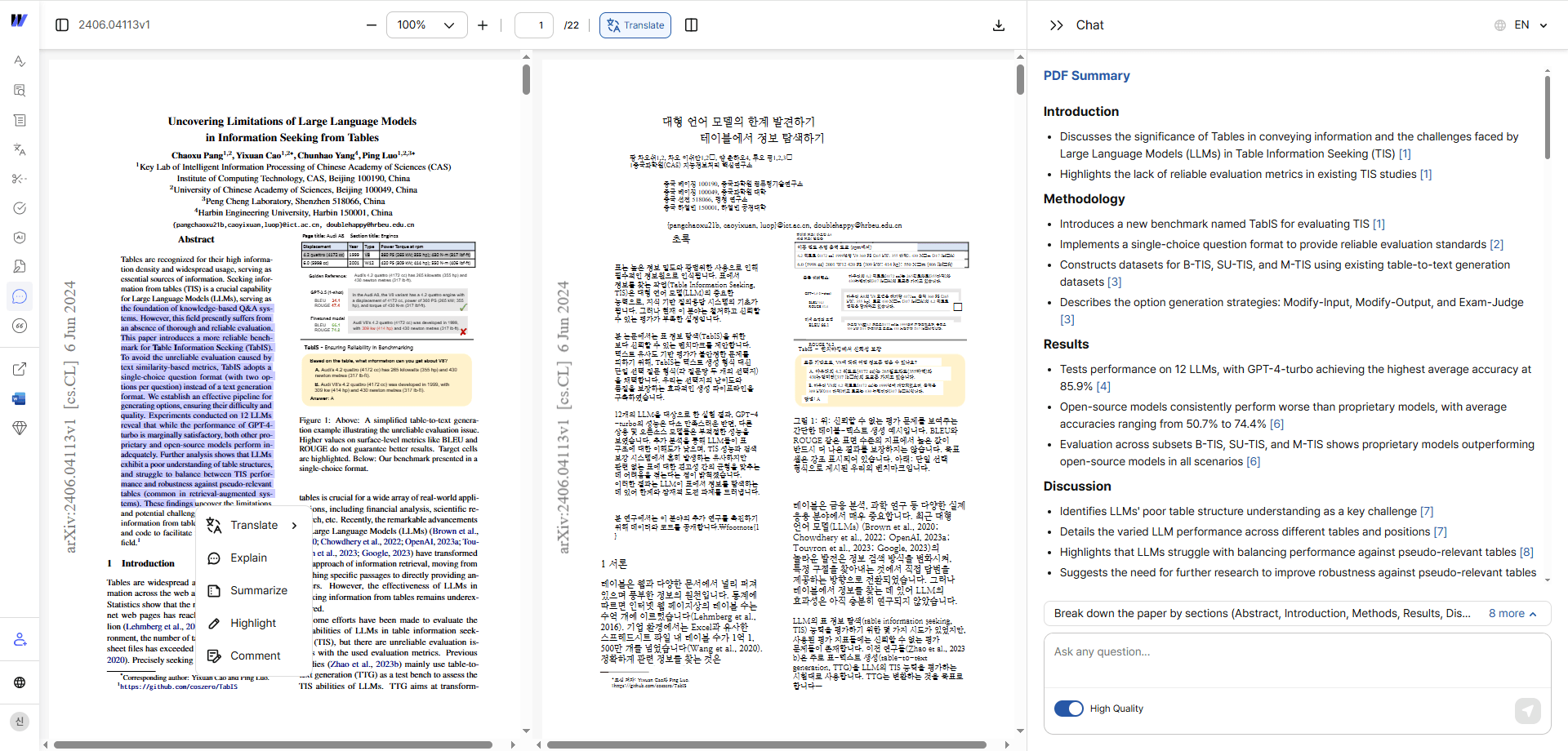
In testing, Wordvice AI ChatPDF generated a clear document summary immediately after upload. The side-by-side translation view presented the original text alongside accurate translations while preserving formulas and academic formatting. Interactive tools—such as highlighting, comments, and range-based summarization—functioned seamlessly within the PDF AI reader. Overall, it provided a fully integrated environment for reading, translating, and exploring academic documents.
Key Takeaway
Wordvice AI ChatPDF’s exceptional translation accuracy and analytical depth in academic research documents make it a top choice for researchers.
Pricing
Wordvice AI ChatPDF is included in Wordvice AI’s pricing plans, giving users access to ChatPDF along with a full suite of AI writing tools.
| Plan | Price | Notes |
|---|---|---|
| Free | $0 / month | - 100 upload pages/month - Unlimited questions - Basic model |
| Premium | $9.95 / month | - 1,000 upload pages/month - Advanced model with downloadable translated PDFs - Full access to all Wordvice AI tools |
| Premium Pro | $26.95 / month | - Unlimited upload pages - Advanced model with downloadable translated PDFs - 1,000 credits for human proofreading, AI detecting and plagiarism checking - Full access to all Wordvice AI tools |
| Team | Custom | For multi-user/team - 1,000 pages/month uploads - Advanced model with downloadable translated PDFs - Full access to all Wordvice AI tools |
While the free plan allows users to test core features of Wordvice AI ChatPDF within reasonable monthly limits, the premium plans enhance access and remove restrictions — reflecting best AI for pdfs pricing for diverse use cases.
2. PDF.ai – ChatPDF Alternative with Unlimited Questions
With its advanced unlimited question model and high response accuracy, PDF.ai consistently ranks as one of the best PDF readers. As a ChatPDF alternative, it removes many of the usage restrictions that frustrate users, allowing deep and continuous interaction with documents.
Key Features
PDF.ai focuses on unrestricted document interaction and accuracy.
- Unlimited questions per document (Ultimate plan only)
- OCR for scanned and image-based PDFs
- Automatic citation generation with page references
- Supports PDFs, Word, PowerPoint, and Excel
Hands-on Testing
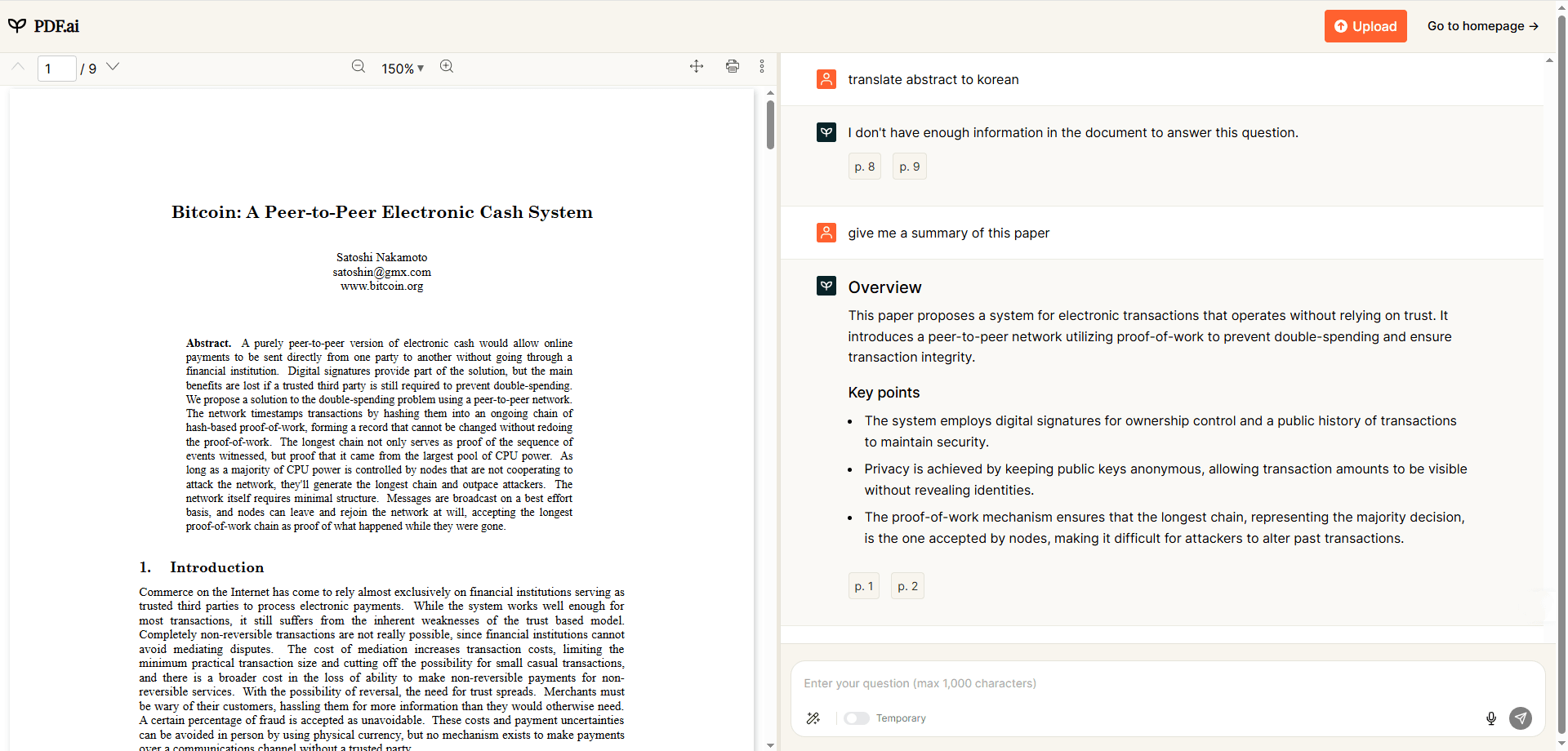
PDF.ai provided a clean and comfortable reading experience and could generate summaries when prompted. However, paragraph-level translation requests failed during testing. The tool also lacked in-document interaction features such as highlighting, comments, or range-based translation. These testing results indicate that PDF.ai is best suited for reading and those seeking an AI-based, Q&A-focused PDF reader.
Pricing
PDF.ai pricing is straightforward.
| Plan | Price | Notes |
|---|---|---|
| Free | $0 / month |
Basic PDF chat access - 1 file upload and 100 monthly questions limit - Basic model |
| Pro | $10 / month |
Suitable for individual users - 100 file uploads and 1000 monthly questions limit - Basic model |
| Ultimate | $20 / month |
Designed for heavy or professional use - Unlimited uploads and no question limit - Advanced model |
Key Takeaway
PDF.ai’s simplicity and fast, intuitive document-based Q&A make it ideal for users who want quick answers without complex features.
3. AskYourPDF – Great AI Reader in Academic Research
Like Wordvice AI, AskYourPDF is widely considered one of the best PDF readers in academic and research environments. It enables more accurate understanding of academic language, research methods, and citation structures than general-purpose PDF AI tools.
Key Features
AskYourPDF is built specifically for research-intensive workflows.
- Plugins for Google Scholar, PubMed, and arXiv
- Document-based conversation history
- Collaborative annotations and research notes
Hands-on Testing
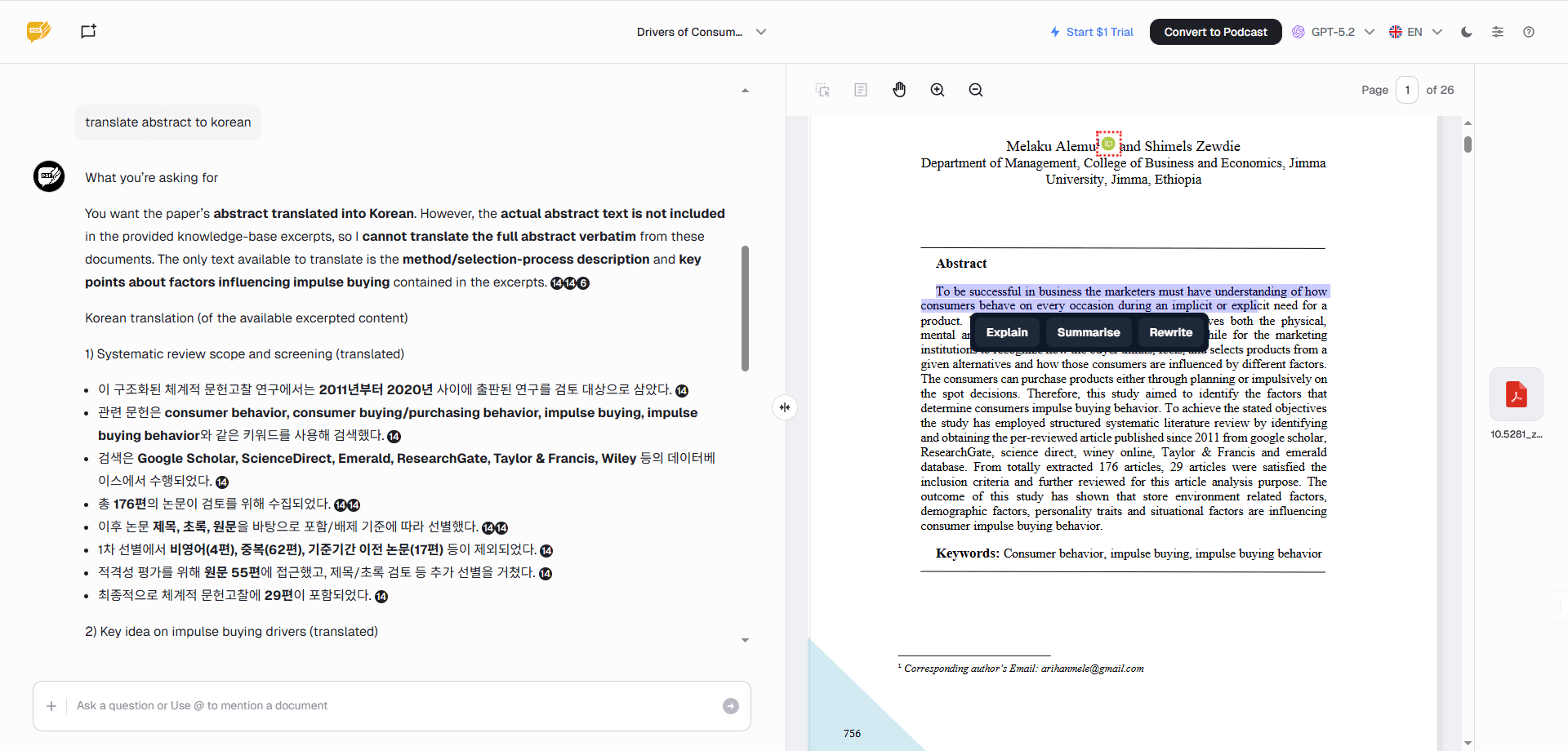
AskYourPDF automatically generated a document summary after upload without consuming any of the limited questions. However, when prompted to translate summaries into a second language, the tool failed to produce translated output. In addition, while it supported paragraph-level explanation, summarization, and rewriting, it did not offer commenting or annotation features. In short, users who need note-taking alongside reading may require an additional tool.
Pricing
AskYourPDF offers academic-friendly pricing.
| Plan | Price | Notes |
|---|---|---|
| Free | $0 / month |
Entry-level plan - 1 file upload and 50 daily questions limit - 1 model |
| Premium | $11.99 / month |
Designed for regular users - 50 file uploads and 1200 daily questions limit |
| Pro | $14.99 / month | Advanced plan for significantly higher or unlimited usage |
| Enterprise | Custom | Team access and custom integrations |
Key Takeaway
AskYourPDF excels in flexible document-based Q&A, especially for users who want seamless integration with ChatGPT and browser extensions.
4. ChatDOC – Powerful PDF AI for Multi-Document Analysis
ChatDOC is a powerful PDF AI tool for users who need to analyze multiple documents at once. While many platforms support multi-file uploads, ChatDOC is designed from the ground up for cross-document reasoning. This makes it ideal for professionals comparing reports, contracts, or research papers across large document sets.
Key Features
ChatDOC excels at large-scale document comparison.
- Multi-document chat across entire PDF collections
- Cross-document comparison and synthesis
- Table and chart analysis within PDFs
- Structured data extraction from multiple files
- Team collaboration with shared document libraries
Hands-on Testing
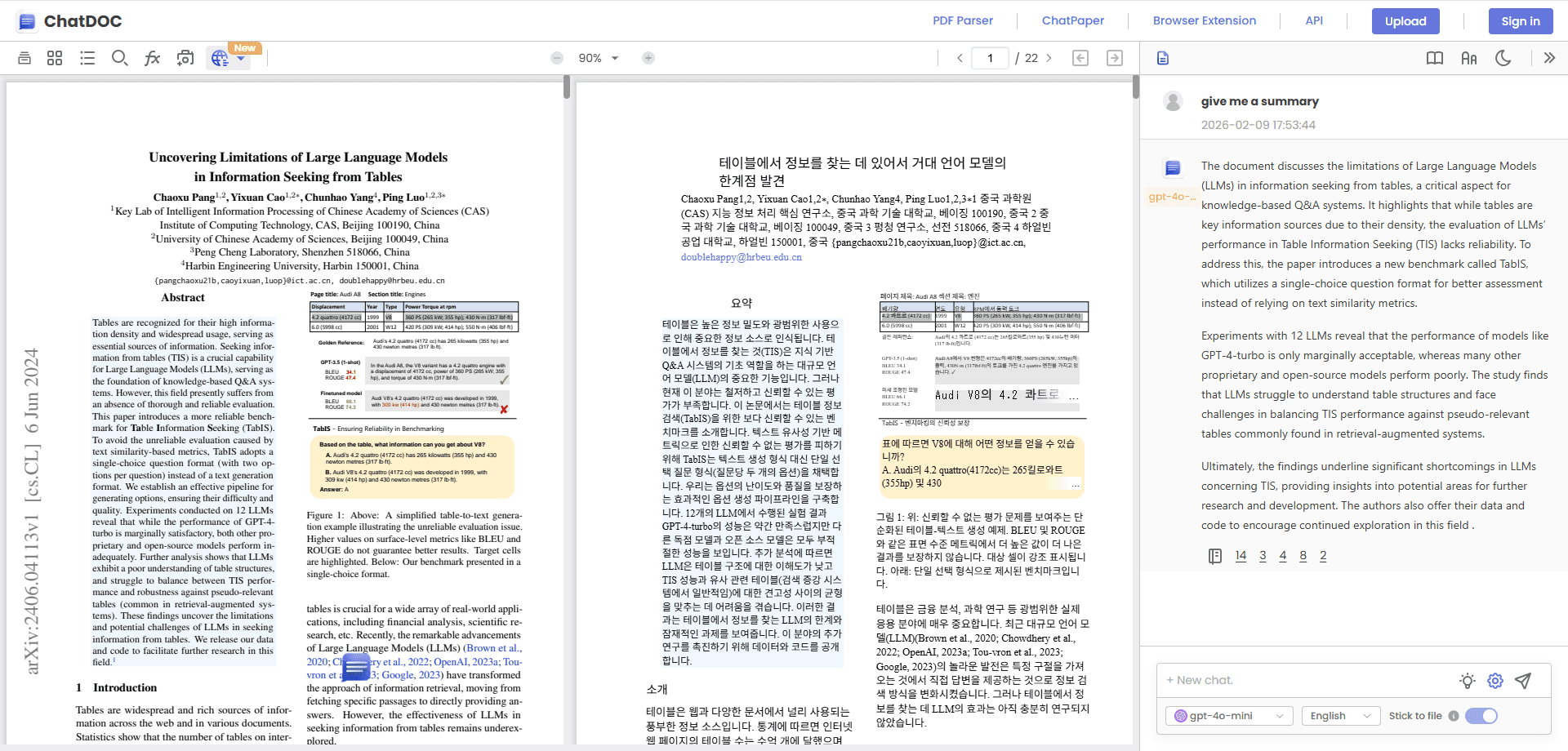
ChatDOC automatically produced a document summary and supported on-demand translation for text content. However, while page layout and charts were visually preserved during translation, chart data accuracy was inconsistent in testing. Meanwhile, although users could ask in-depth questions based on selected ranges, annotation and color-highlighting features were not available. Thus, chart-heavy documents may require extra verification.
Pricing
ChatDOC’s pricing reflects its professional focus.
| Plan | Price | Notes |
|---|---|---|
| Free | $0 / month |
Limited multi-document analysis - 10 monthly file uploads - Limited daily questions |
| Pro | $89.90 / year |
Advanced users - 300 monthly file uploads - Unlimited daily questions |
Key Takeaway
ChatDOC’s ability to analyze multiple documents simultaneously and deliver fast, citation-backed insights make it especially useful for research and professional workflows.
5. SmallPDF – A Practical Choice Among ChatPDF Alternatives
Best known for its PDF management tools rather than conversational AI, SmallPDF has gradually added AI features to its platform. Users exploring ChatPDF alternatives may appreciate the fact that SmallPDF prioritizes document manipulation over AI, which acts as a secondary enhancement rather than a full-featured PDF AI reader.
Key Features
SmallPDF combines classic PDF utilities with light AI assistance.
- PDF conversion, compression, merge, and split tools
- AI-powered document summaries and basic Q&A
- OCR support for scanned PDFs
- Cloud storage integrations (Google Drive, Dropbox, OneDrive)
- Strong security and automatic file deletion
Hands-on Testing
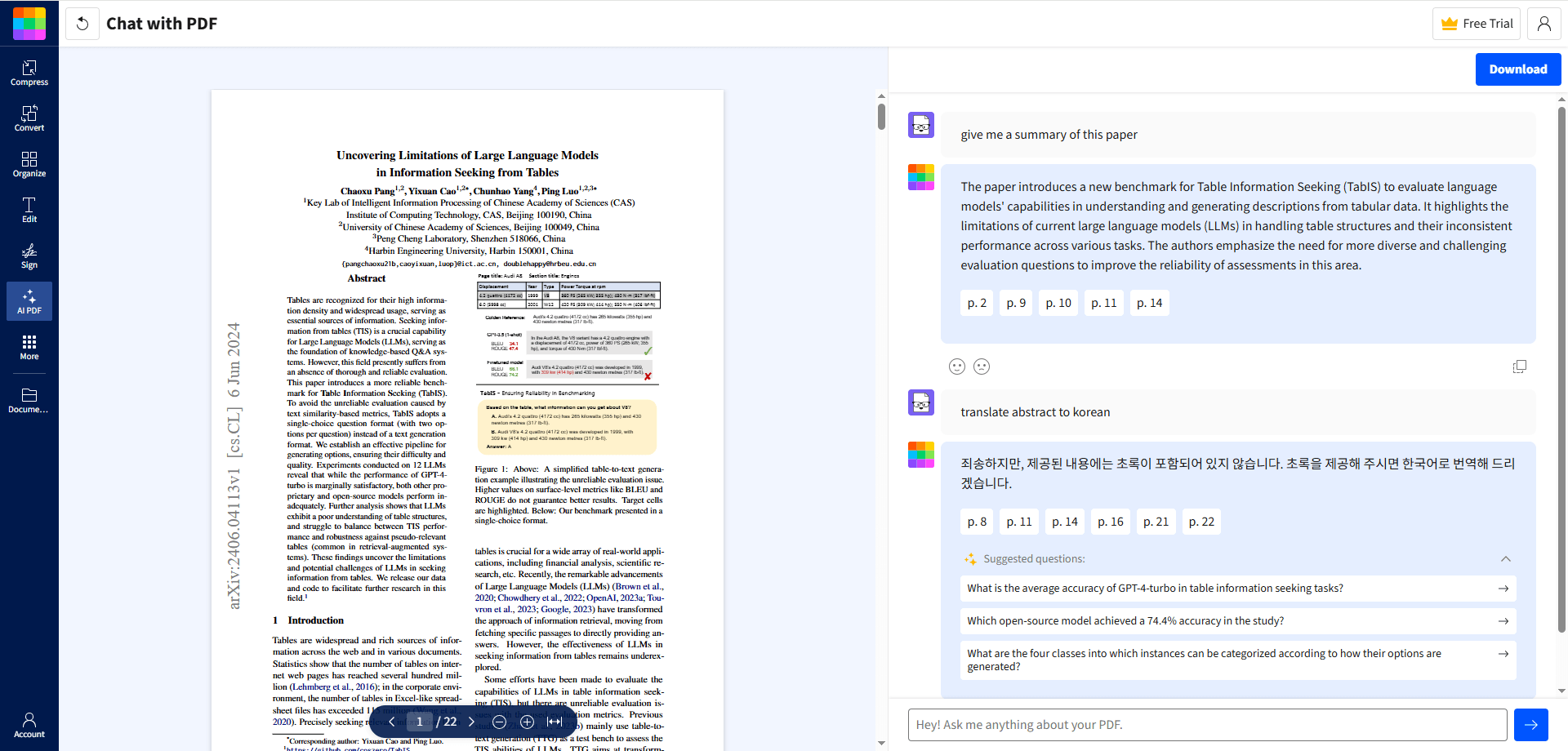
SmallPDF generated document summaries through manual prompts and supported range-based explanations and summaries. Although direct translation commands for entire summary sections did not work as expected, selecting specific text and using the built-in translation button successfully produced translations. In short, while SmallPDF is equipped with a translation feature, it is less intuitive than other tools.
Pricing
SmallPDF follows a freemium pricing model.
| Plan | Price | Notes |
|---|---|---|
| Free | $0 / month |
- 4 daily file uploads - 20 questions/day limit |
| Pro | $12 / month |
- Unlimited file uploads - No daily question limit |
| Business | Custom | Unlimited plan for Teams |
Key Takeaway
SmallPDF’s quick PDF edit and simple AI explanation capacities make it suitable for users who want fast, easy document handling without advanced analysis features.
Top 5 Best PDF AI Tools – Complete Comparison
| Tool | Best For | Pricing | Key Strengths |
|---|---|---|---|
| Wordvice AI ChatPDF |
- Students - Researchers - Multilingual users |
- Free - $9.95/month |
AI PDF reader with unlimited questions, academic-focused explanations, and built-in translation—designed specifically for researchers and academic use. |
| PDF.ai |
- General users - Power readers |
- Free - $10/month |
Unlimited AI read-PDF queries, strong OCR, multi-document support, excellent value |
| AskYourPDF |
- Students - Researchers - Academics |
- Free - $11.99/month |
Citation support, scholarly context understanding, literature-review workflows |
| ChatDOC |
- Professionals - Teams |
- Free - $89.90/year |
Cross-document comparison, shared workspaces, team features |
| SmallPDF | - General PDF users |
- Free - $12/month |
Full PDF utilities |
Final Recommendations and Summary of the Best PDF AI Tools for Different Use Cases
Different use cases require PDF AI tools with different strengths. While some platforms focus on quick document Q&A, others are built for academic depth or multilingual workflows.
Wordvice AI ChatPDF and AskYourPDF are optimized for those with academic and research-focused needs. Both are designed for scholarly documents with context-aware, citation-sensitive responses. In the final analysis, Wordvice AI ChatPDF’s combination of there features with multilingual translation support and a comprehensive suite of AI writing tools make it a particularly compelling choice for academics and researchers.
Meanwhile, for unrestricted exploration across document types, PDF.ai and Wordvice AI ChatPDF provide strong value with unlimited interactions. These tools go beyond basic AI PDF reader capacities, facilitating deeper and more flexible document analysis.
Ultimately, you should choose the PDF AI tool that best fits how you read and analyze PDFs. The right tool is the one that fits your workflow—so testing a few PDF AI tools is the most effective way to find the option that truly improves how you work with documents.